


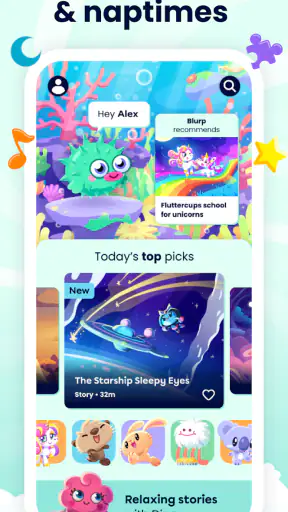
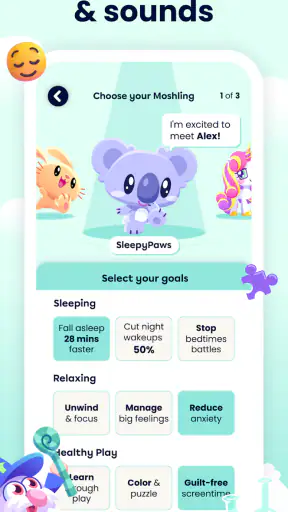
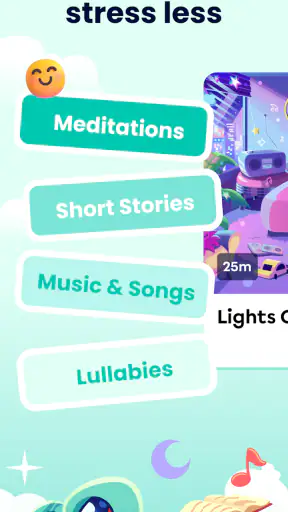
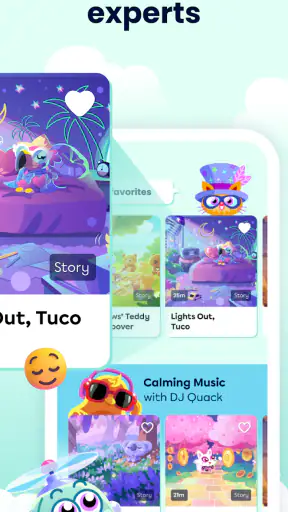


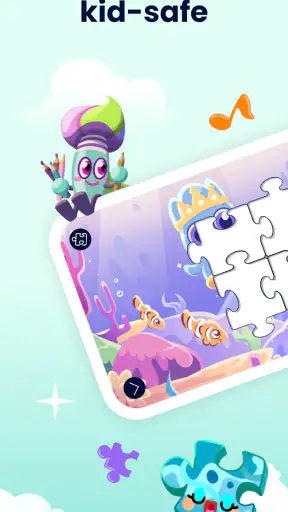

I approached Moshi Kids: Sleep, Relax, Play as a parent would: not simply asking whether it can keep a child busy, but whether it feels comfortable to include in a daily routine. This free education app from Mind Candy Ltd brings together stories, sounds, music, and games in a child-friendly package. Its purpose is clearly broader than filling a few quiet minutes. It aims to make bedtime, rest, and gentle play easier to manage.
My overall impression is positive, with one important qualification: this is most useful when you treat it as a guided part of family life rather than an automatic solution for sleep or calm. The content has a softer tone than many brightly competitive children’s apps, and that changes how it fits into the evening. At the same time, families should pay attention to account choices, in-app purchase controls, and how the child uses a screen before bed. The app can support a routine, but it cannot replace one.
How Moshi Kids fits into a child’s routine
The app belongs to the education category, although I would describe its practical role as a mix of calm entertainment and early-learning support. Stories invite listening, music creates a relaxed background, sounds can help establish a quiet atmosphere, and games add a more active option for moments when the child is ready to play. That combination makes it more flexible than an app built only around bedtime audio.
I found that flexibility useful because children do not arrive at bedtime in the same mood every evening. On a settled night, a story or gentle sound can become the final activity before lights out. On a restless afternoon, a game may be a better starting point, followed by something quieter. The important detail is that the sections serve different purposes, so I would not use the most stimulating option immediately before trying to settle a child.
The developer, Mind Candy Ltd, has given the app a clear identity rather than presenting it as a general-purpose video platform. That matters for families who want a narrower environment than an open-ended entertainment service. Instead of handing a child a broad feed and hoping the next item is suitable, I would choose the activity myself and keep the session intentional.
The app is marked for Everyone, which makes it approachable for family use, but an age label should not be treated as a substitute for supervision. A younger child may need help navigating, choosing content, or understanding when the session is finished. An older child may find some of the calmer material too young, especially if they want deeper challenges or more independent learning.
What I noticed about the calm-first design
The strongest idea here is not any single story or sound. It is the way the different content types can be arranged into a predictable sequence. A parent can move from a short game to music, then to a story, instead of switching from an energetic app to a completely separate bedtime tool. That continuity reduces the number of decisions at the end of a long day.
My practical tip is to decide the order before handing over the device. If a child is allowed to browse freely at the point when they should be winding down, the choice itself can become stimulating. Selecting one activity in advance gives the app a clearer boundary and makes it easier to say, “This is the last one.” That is a small habit, but it is more valuable than simply installing another sleep app.
I would also keep the device physically away from the pillow and use audio as the main experience whenever possible. The app’s stories, sounds, and music can work without requiring a child to stare at the display continuously. That makes it more suitable for a bedtime routine than a visually demanding game, although the adult still needs to manage the transition from screen use to sleep.
Everyday use: a realistic evening example
Imagine a child who has already had dinner and brushed their teeth but is still too alert to settle. I would begin with a brief, low-pressure game only if the child genuinely needs a gentle transition. After that, I would move to music or a calming sound and finish with a story while the room is dim. The point is not to keep adding content until the child falls asleep; it is to create a recognizable path toward quiet.
On another day, I might skip the game entirely. If the child is tired or emotionally overloaded, more interaction could work against the goal. In that situation, going straight to a story is the better use of the app. This is one of the trade-offs: the presence of games gives the app variety, but variety also means parents must choose carefully rather than assume every section belongs in the bedtime sequence.
During travel, the same structure can be useful in a different way. A story or sound may help occupy a child during a quiet part of a journey without the intensity of an action game. I would prepare the device beforehand, check that the selected content is ready, and avoid making the app the only source of entertainment. That keeps it as a helpful tool rather than something the child expects whenever boredom appears.
Trust begins with visible choices
Because this is a children’s app, I pay closer attention to trust than I would with an ordinary music player. The public product details identify Mind Candy Ltd as the developer, show a 4.6 average from around 7,100 ratings, and indicate more than one million installs. Those figures suggest that many families have tried it, but popularity alone does not tell me whether a particular household will be comfortable with its controls.
The app is free to install, while optional purchases range from $0.99 to $239.99 per item. That is the point where I would slow down and set expectations. A child should not be left to explore purchase screens independently, even if the app feels gentle and age-appropriate. I would use the device’s purchase authentication, keep payment approval with an adult, and explain that choosing a story or game is different from buying something.
I do not see the free entry point as a reason to assume that every part of the experience is open without limits. Families should read the purchase prompts on their own device and decide whether the available content matches their budget and expectations. The safest workflow is simple: the adult installs the app, reviews the visible options, configures purchase protection, and only then introduces it to the child.
This is also where the app may not suit everyone. If you want a completely purchase-free experience with no need to monitor account prompts, a smaller offline collection of parent-selected audio may feel more comfortable. Moshi Kids offers convenience and variety, but that convenience comes with a responsibility to supervise the commercial side of the experience.
Account control and data-sensitive moments
My cautious approach is to distinguish between what I can control visibly and what I should not assume. I would look at every permission request, account screen, notification option, and purchase prompt presented during setup. If the app asks for something that is not needed for the way my family plans to use it, I would decline it or reconsider the installation. I would not grant access automatically just because the app is intended for children.
The most sensitive moments are usually not the story itself. They are onboarding, sign-in, profile creation, purchases, notifications, and any point where a child might be encouraged to continue without an adult noticing. I would complete those steps myself and keep the device’s general account protected. If the app offers a choice between using it in a limited way and creating a fuller account, I would begin with the least data-intensive option that still provides the functions we need.
I would also check the privacy information shown inside the app or its store page before creating an account. The important question for me is not whether a product uses the word “kids,” but whether the adult can understand what is requested, why it is requested, and how to change the choice later. If those explanations are hard to find, that is a reason to pause rather than click through quickly.
Parents should remember that a child’s voice, name, routine, or preferences can feel like harmless details, yet families may still prefer not to share more than necessary. I would avoid entering personal information into optional fields and would not allow a child to use an adult’s account unsupervised. These habits are useful even when an app’s content itself feels wholesome.
Keeping the child in control without giving away adult control
Good child-focused design should give children meaningful choices while leaving important decisions with the adult. Moshi Kids works best in that balance. I would let a child choose between two preselected stories or decide whether to listen to music or a sound, but I would keep the final say over session length, purchases, account settings, and notifications.
A useful routine is to create a small menu before the child starts: one activity for active play, one for winding down, and one backup in case the first choice does not fit the mood. This avoids endless browsing and gives the child agency within clear limits. It also helps parents learn which type of content actually supports their child instead of relying on the app’s broad collection indiscriminately.
I would not use the app as a bargaining tool every night, such as promising unlimited access for good behavior. That can turn a calming resource into a source of arguments. A consistent rule works better: one chosen activity, a clear stopping point, and the same handoff to brushing teeth, reading, or lights out. The application can support that pattern, but the family rule has to come from the adult.
Notifications deserve the same attention. If reminders appear, I would decide whether they are genuinely useful or whether they might interrupt family time and encourage more screen use. A child’s rest routine should not depend on an alert from an app. I prefer to start the activity when it fits our schedule, not when a device tells us to.
Where it beats ordinary alternatives
Compared with an open video service, Moshi Kids feels easier to keep focused because its purpose is narrower. Open platforms can offer more variety, but they also make recommendations, autoplay, and unexpected discoveries part of the experience. For a bedtime setting, that uncertainty is a real disadvantage. I would choose Moshi Kids when I want a contained selection of stories, sounds, music, and games rather than a broad entertainment feed.
Compared with a dedicated white-noise or sleep-sound app, it offers more ways to match a child’s mood. A sound-only tool may be better for an adult who wants a simple background track with no stories or games. Moshi Kids is more appropriate when a child benefits from a familiar narrative or needs a gentle transition before listening quietly.
Compared with a traditional children’s game, its calmer material gives it a better place in a family routine. However, a specialist learning app may be stronger if the goal is structured practice in reading, mathematics, spelling, or another clearly measured subject. I would not choose Moshi Kids as a replacement for schoolwork. Its educational value is more connected to listening, imagination, emotional settling, and independent choice than to formal lessons.
Compared with a parent-read storybook, it is more convenient when the adult is busy or unavailable for a few minutes. Still, it cannot reproduce the personal connection of a parent reading aloud. I would use it to complement shared reading, not to remove that ritual. The best choice depends on whether the immediate need is convenience, connection, quiet background audio, or active learning.
Practical limits I would consider before installing
The first limitation is that the app requires judgment. Its mixture of content is a strength, but it means the parent has to match the activity to the moment. A game that is perfectly reasonable after school may be a poor choice five minutes before sleep. Families looking for a one-purpose tool may find a simpler alternative easier to manage.
The second is the screen boundary. Even when the audio is calming, the child may still want to look at the device, tap through options, or ask for another selection. I would start the story or sound, lower the visual emphasis where practical, and place the device out of reach. If my child keeps returning to the screen, I would stop using it at bedtime and reserve it for daytime quiet time.
The third is the purchase structure. Free installation makes trying the app straightforward, but the range of optional purchase amounts means adults should establish controls before a child explores. For a family that dislikes subscriptions, upgrades, or in-app decision points, this may create more friction than a collection of purchased books or locally stored audio.
There is also the question of fit. Some children respond well to imaginative stories and gentle soundscapes; others become more alert when any device is introduced. If the app makes bedtime longer, noisier, or more negotiable, it is not helping, regardless of how carefully it is designed. I would judge it by the child’s actual response over several evenings, not by the promise of calmer sleep.
Installation details and what to check first
The app was released on December 6, 2017, and the current version is 10.12.0. It requires Android 8.0 or later, so I would check an older family device before planning to use it there. That compatibility detail is especially relevant if the intended device is a hand-me-down tablet kept for children.
Since it is available at no upfront cost, I would treat the first launch as a setup session for the adult, not as the child’s first play session. I would review the visible account flow, permissions, notification choices, and purchase protections, then decide which content type belongs in our routine. This takes a little longer than simply opening the app, but it prevents the child from encountering adult decisions unexpectedly.
I would also test the volume at night and consider whether the device’s other alerts could interrupt the experience. A calm story is less useful if a message, call, or unrelated notification suddenly appears. Using a dedicated child profile or a device configured for quiet hours can make the session feel more consistent, provided those controls are available on the device being used.
For families sharing one device, I would keep the app’s role clear. It should not become the default answer to every request for entertainment. Alternating it with physical books, quiet conversation, drawing, or ordinary music helps the child understand that Moshi Kids is one tool among several. That variety also makes it easier to tell whether the app is genuinely helping.
My cautious verdict for families
I recommend Moshi Kids to parents who want a child-oriented mix of stories, sounds, music, and games that can move from gentle play toward quiet time. The app’s strongest use is as part of a predictable routine, especially when an adult chooses the content and manages the stopping point. Its Everyone rating, free entry, and broad install base make it easy to consider, while the 4.6 average from around 7,100 ratings suggests a generally favorable reception.
I would skip it if your priority is a completely hands-off bedtime solution, a strictly academic learning program, or an experience with no optional purchase decisions. I would also avoid using it at night if your child becomes more alert around screens. In those cases, a parent-read book, a simple audio player, or a more focused educational tool may be a better match.
For everyone else, my advice is to start small. Install it on a compatible device, configure adult controls before sharing it, choose one short routine, and observe whether the child settles more easily or simply asks for more content. Keep personal information and purchases under adult control, review permissions and account choices as they appear, and treat the app as support rather than a promise.
That cautious approach is why I see Moshi Kids as worthwhile. It is not valuable merely because it contains relaxing material; it is valuable when a family uses that material deliberately. The best experience comes from combining the app’s calm content with clear boundaries, limited choices, and an adult who remains in charge of the digital details.


